Vue script setup 中 defineProps 的编译边界与错误排查
在 Vue 3 的 <script setup> 里,defineProps 看起来像一个函数,但它不是普通运行时函数。它是 编译器宏:源码里写出来,构建时被 @vue/compiler-sfc 识别并替换,最终运行在浏览器里的代码里不应该再出现它。
这个差别平时不太容易被注意到,因为常见写法都很自然:
const props = defineProps<{ foo: string }>();问题通常出现在想顺手再包一层的时候。比如需要把 props 里的字段转成 Ref,于是写成:
const { foo } = toRefs(defineProps<{ foo: string }>());按普通函数理解,这句代码只是把 props 对象转成 refs。但编译器识别宏时,并不会沿任意函数的参数递归查找 defineProps()。外面包上 toRefs() 后,宏调用会残留到浏览器里,变成运行时错误。
<script setup> 实际上会先被编译
.vue 文件里的 <script setup> 不是浏览器最终执行的脚本块。它是 Vue SFC 编译器提供的一层语法,构建时会被 @vue/compiler-sfc 转成普通组件代码,常见产物就是一个 defineComponent({ ... })。
开发时会看到:
<script setup lang="ts">
const props = defineProps<{ foo: string }>();
</script>
浏览器运行时真正接近的是:
import { defineComponent as _defineComponent } from 'vue';

export default /*#__PURE__*/_defineComponent({
  props: {
    foo: { type: String, required: true }
  },
  setup(__props) {
    const props = __props;

    return { props };
  }
});这只是一个简化例子。实际编译过程中,<script setup> 还会处理更多事情:顶层变量会暴露给模板使用,defineProps 会生成组件 props 选项,defineEmits 会生成 emits 选项,defineExpose 会改写成 setup 上下文里的 expose 调用,defineOptions 会合并到组件选项,defineModel 会生成对应 prop、emit 和模型 ref,顶层 await 也会让 setup 变成 async setup。
这些能力成立的前提是:编译器能在源码 AST 里识别出对应宏调用。defineProps、defineEmits、defineExpose、defineOptions、defineSlots、defineModel、withDefaults 都属于这一类。除了 Vue 明确支持的组合形态,不要把这些宏随便包进普通运行时函数里,例如 readonly(defineProps(...))、custom(defineEmits(...))、someFn(defineModel(...)) 这类写法都不应该作为可用模式。
useSlots() 和 useAttrs() 不一样。它们是 Vue 明确提供的运行时函数,返回 setup context 里的 slots 和 attrs;这类函数按普通 Composition API 使用即可,不属于本文讨论的编译器宏残留问题。
- Vue 官方文档:
<script setup>说明了<script setup>的编译语义、宏能力、顶层绑定、withDefaults、defineModel、defineExpose和useSlots/useAttrs的区别。
现象
在一个 Vue 3.4 项目里,页面原本需要从 props 里拿到 svipLevel,再用于埋点通参:
const props = defineProps<{ svipLevel: number }>();
const { svipLevel } = toRefs(props);
const { t } = useI18n();
const { isCollapsed } = useCollapse();
const eventReportParams = computed(() => ({ source: 'svip_center', svip_level: svipLevel.value }));
const { handleClick } = useOpenPopupPage({ eventReportParams });
正确写法是先把 defineProps 单独放出来,再交给 toRefs。
出问题的写法是把它直接包进 toRefs:
const { svipLevel } = toRefs(defineProps<{ svipLevel: number }>());页面表现常常会先变成切换 Tab 或组件更新时白屏,控制台后面再出现类似错误;直观的 defineProps 报错反而容易被淹没:
TypeError: Cannot read properties of null (reading 'emitsOptions')
    at shouldUpdateComponent
    at updateComponent
    at processComponent
    at patch
这个错误看起来像组件 emits 配置有问题,但在这次现场中,更早还能找到 defineProps is not defined 和 setup 执行失败的提示。宏残留可以通过编译结果直接确认;后面的 emitsOptions 不能单独用来判断根因,还需要结合最早错误和更新时的 vnode 状态排查。
项目里的 Vue 版本
这个现场来自一个 Vue 3.4 项目。package.json 里锁定的是:
{
  "vite": "~4.5.5",
  "vue": "3.4.24"
}
本地实际安装的 vue 和 @vue/compiler-sfc 也都是 3.4.24。这点很重要,因为 Vue 3.5 之后对 props 解构做过增强,某些写法在新版本里语义已经不同,但这不代表宏可以被任意函数包裹。
- Vue 官方文档:Props / Reactive Props Destructure 说明了 Vue 3.4 及以下和 Vue 3.5 及以上 props 解构响应性的差异。
defineProps 到底会被编译成什么
可以用 @vue/compiler-sfc 编译一个最小例子看结果。
源码:
import { toRefs } from 'vue';

const props = defineProps<{ foo: string }>();
const { foo } = toRefs(props);
编译后关键部分是:
import { defineComponent as _defineComponent } from 'vue'
import { toRefs } from 'vue';

export default /*#__PURE__*/_defineComponent({
  __name: 'stable',
  props: {
    foo: { type: String, required: true }
  },
  setup(__props: any, { expose: __expose }) {
    __expose();

    const props = __props;
    const { foo } = toRefs(props);

    return { props, foo, toRefs };
  }
});
这里有两个变化:
defineProps<{ foo: string }>()被拿来生成了组件的props选项。- setup 里真正能访问到的是 Vue 传进来的
__props,原来的defineProps调用已经不存在了。
这才是正常结果。defineProps 只负责在编译期告诉 Vue「这个组件有哪些 props」,不应该进入浏览器运行时。
包进 toRefs 后发生了什么
再看有问题的写法:
import { toRefs } from 'vue';

const { foo } = toRefs(defineProps<{ foo: string }>());
编译后的关键部分会变成:
import { defineComponent as _defineComponent } from 'vue'
import { toRefs } from 'vue';

export default /*#__PURE__*/_defineComponent({
  __name: 'nestedToRefs',
  setup(__props, { expose: __expose }) {
    __expose();

    const { foo } = toRefs(defineProps<{ foo: string }>());

    return { foo, toRefs };
  }
});
最关键的问题就在这一行:
const { foo } = toRefs(defineProps<{ foo: string }>());defineProps 没有被替换成 __props,也没有被拿去生成组件的 props 选项。它作为一个调用表达式残留在 setup 里。
后续 TypeScript 转 JavaScript 时,类型参数会被去掉,浏览器真正执行时大致会变成:
const { foo } = toRefs(defineProps());运行时没有 defineProps 这个函数,所以就会报:
ReferenceError: defineProps is not defined如果这个错误被控制台大量日志淹没,或者后续 Vue 更新流程继续抛出内部错误,最后看到的就可能是更迷惑的 emitsOptions 报错。
编译器为什么没有识别里面那层 defineProps
原因在 @vue/compiler-sfc 的识别方式。
@vue/compiler-sfc 处理 .vue 文件时,会先解析出 SFC 结构,再把 <script setup> 里的代码解析成 JavaScript / TypeScript 的 AST。后面贴到的 node.type、decl.init、callee、arguments 都是 AST 节点上的信息,不是源码字符串本身。
宏识别也发生在这层 AST 上。Vue 编译 <script setup> 时,会遍历顶层语句;遇到变量声明时,它看的是变量初始化表达式,也就是 decl.init:
- vuejs/core v3.4.24:
compileScript.ts对应<script setup>顶层语句和变量声明的处理入口。- vuejs/core v3.4.24:
defineProps.ts对应processDefineProps和processWithDefaults的源码。
对应源码在 vuejs/core@v3.4.24 的 packages/compiler-sfc/src/compileScript.ts。
// packages/compiler-sfc/src/compileScript.ts:510-532
if (node.type === 'VariableDeclaration' && !node.declare) {
  const total = node.declarations.length
  let left = total
  let lastNonRemoved: number | undefined

  for (let i = 0; i < total; i++) {
    const decl = node.declarations[i]
    const init = decl.init && unwrapTSNode(decl.init)
    if (init) {
      if (processDefineOptions(ctx, init)) {
        ctx.error(
          `${DEFINE_OPTIONS}() has no returning value, it cannot be assigned.`,
          node,
        )
      }

      const isDefineProps = processDefineProps(ctx, init, decl.id)
      const isDefineEmits =
        !isDefineProps && processDefineEmits(ctx, init, decl.id)
processDefineProps 继续判断这个表达式是不是 defineProps(...):
对应源码在 packages/compiler-sfc/src/script/defineProps.ts。
// packages/compiler-sfc/src/script/defineProps.ts:47-54
export function processDefineProps(
  ctx: ScriptCompileContext,
  node: Node,
  declId?: LVal,
) {
  if (!isCallOf(node, DEFINE_PROPS)) {
    return processWithDefaults(ctx, node, declId)
  }
而 isCallOf 的判断很直接:当前节点必须是一个调用表达式,并且 callee 必须是目标名字。
对应源码在 packages/compiler-sfc/src/script/utils.ts。
// packages/compiler-sfc/src/script/utils.ts:34-46
export function isCallOf(
  node: Node | null | undefined,
  test: string | ((id: string) => boolean) | null | undefined,
): node is CallExpression {
  return !!(
    node &&
    test &&
    node.type === 'CallExpression' &&
    node.callee.type === 'Identifier' &&
    (typeof test === 'string'
      ? node.callee.name === test
      : test(node.callee.name))
  )
}
直接调用宏、普通函数包装和 withDefaults 专用分支,对应不同的初始化表达式:
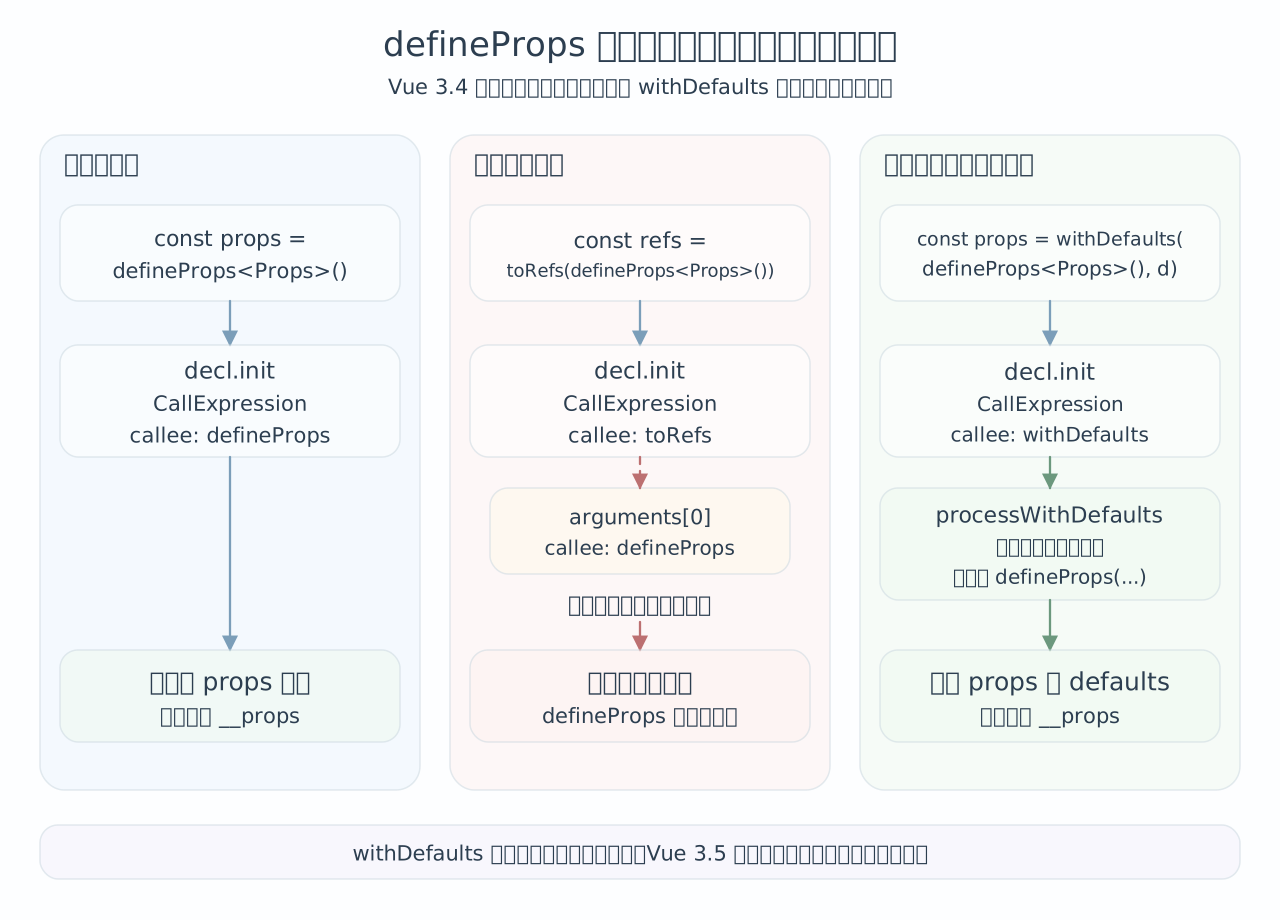
图中只保留与宏识别相关的 AST 节点;类型参数、参数对象等无关节点已省略。
const props = defineProps<Props>();变量初始化表达式的 callee 是 defineProps,编译器能识别。
const { foo } = toRefs(defineProps<Props>());编译器第一眼看到的是 toRefs(...),不是 defineProps(...)。它不会把任意函数参数继续当成宏入口递归处理,所以这段不会被当成 props 声明。
这段识别逻辑检查的是当前调用节点,没有通用的参数递归分支。外层换成 toRefs、readonly 或自定义 helper,都不能按普通函数组合的方式推断宏仍然有效;withDefaults 能用,则有下面的专用分支支持。
为什么 withDefaults(defineProps(...)) 可以
withDefaults 也是包了一层,但它能工作,因为 Vue 编译器对它写了专门分支。
对应源码在 packages/compiler-sfc/src/script/defineProps.ts。
// packages/compiler-sfc/src/script/defineProps.ts:94-130
function processWithDefaults(
  ctx: ScriptCompileContext,
  node: Node,
  declId?: LVal,
): boolean {
  if (!isCallOf(node, WITH_DEFAULTS)) {
    return false
  }
  if (!processDefineProps(ctx, node.arguments[0], declId)) {
    ctx.error(
      `${WITH_DEFAULTS}' first argument must be a ${DEFINE_PROPS} call.`,
      node.arguments[0] || node,
    )
  }
  if (ctx.propsRuntimeDecl) {
    ctx.error(
      `${WITH_DEFAULTS} can only be used with type-based ` +
        `${DEFINE_PROPS} declaration.`,
      node,
    )
  }
  if (ctx.propsDestructureDecl) {
    ctx.error(
      `${WITH_DEFAULTS}() is unnecessary when using destructure with ${DEFINE_PROPS}().\n` +
        `Prefer using destructure default values, e.g. const { foo = 1 } = defineProps(...).`,
      node.callee,
    )
  }
  ctx.propsRuntimeDefaults = node.arguments[1]
  if (!ctx.propsRuntimeDefaults) {
    ctx.error(`The 2nd argument of ${WITH_DEFAULTS} is required.`, node)
  }
  ctx.propsCall = node
  return true
}
这段逻辑说明了两件事:
- 外层如果是
withDefaults(...),编译器会进入专门的processWithDefaults。 withDefaults的第一个参数必须继续是defineProps(...),否则直接报错。
withDefaults(defineProps(...), defaults) 能用,是因为 withDefaults 本身也是 Vue 认识的宏形态,不能把它理解成「宏可以被任意包裹」。
对应源码:
const props = withDefaults(defineProps<{ foo?: string }>(), {
  foo: 'x'
});
编译后会生成 runtime props default:
export default /*#__PURE__*/_defineComponent({
  __name: 'withDefaults',
  props: {
    foo: { type: String, required: false, default: 'x' }
  },
  setup(__props: any, { expose: __expose }) {
    __expose();

    const props = __props;

    return { props };
  }
});
常见可用写法
日常写 Vue 3.4 项目时,defineProps 更适合按几种固定语法形态来记。
只声明 props,模板里直接用
defineProps<{
  foo: string;
}>();
这种适合 <script setup> 不需要在 TS 逻辑里读 props,只在模板里使用的情况。
在逻辑里使用 props 对象
const props = defineProps<{
  foo: string;
}>();

const title = computed(() => props.foo);这是最稳定、最容易理解的写法。props.foo 在 computed、watch getter、普通函数里都很清楚。
需要 Ref 时先拿 props,再 toRefs
const props = defineProps<{
  foo: string;
}>();

const { foo } = toRefs(props);

const title = computed(() => foo.value);
这适合后续逻辑明确需要 .value,或者要把某个 prop 传给另一个 composable,并且对方需要 Ref<T> 的情况。
类型声明 props 需要默认值时用 withDefaults
const props = withDefaults(
  defineProps<{
    foo?: string;
    labels?: string[];
  }>(),
  {
    foo: 'hello',
    labels: () => []
  }
);
在 Vue 3.4 及更早版本里,类型声明的 props 如果要写默认值,withDefaults 是官方推荐入口。
常见危险写法
这些写法都不要用:
const { foo } = toRefs(defineProps<Props>());

const foo = toRef(defineProps<Props>(), 'foo');

const props = readonly(defineProps<Props>());

const props = customNormalizeProps(defineProps<Props>());
它们的共同点在最外层:变量初始化表达式已经不是 defineProps(...) 或 Vue 特别识别的 withDefaults(...),编译器就不会把它当成宏入口处理。
如果确实需要这些运行时处理,先把宏单独写出来:
const props = defineProps<Props>();

const { foo } = toRefs(props);
const readonlyProps = readonly(props);
const normalizedProps = customNormalizeProps(props);
Vue 3.5 的响应式 props 解构发生在宏识别之后,仍要求 defineProps() 位于编译器支持的位置。它没有让嵌套调用变成合法宏声明。完整内容见Vue 3.5 的解构边界弹窗。
为什么最后看到的是 emitsOptions
Cannot read properties of null (reading 'emitsOptions') 这类错误容易误导排查方向。
Vue runtime 里 shouldUpdateComponent 会从旧 vnode 上拿组件实例,再读它的 emitsOptions:
对应源码在 packages/runtime-core/src/componentRenderUtils.ts。
// packages/runtime-core/src/componentRenderUtils.ts:358-365
export function shouldUpdateComponent(
  prevVNode: VNode,
  nextVNode: VNode,
  optimized?: boolean,
): boolean {
  const { props: prevProps, children: prevChildren, component } = prevVNode
  const { props: nextProps, children: nextChildren, patchFlag } = nextVNode
  const emits = component!.emitsOptions
这里报空值错误,能直接说明的是:这次读取时,旧 vnode 的 component 为空。它不能证明「setup 报错导致实例没有创建」;同一版本的 mountComponent 先把 createComponentInstance() 的结果写入 initialVNode.component,之后才调用 setupComponent()。
这次现场先出现宏残留的运行时错误,修正宏调用后页面恢复。但仅凭这两条堆栈,还无法还原旧 vnode 为什么没有实例;若修正后仍报 emitsOptions,需要继续检查该 vnode 的挂载、复用和更新过程。
排查这类白屏时,先找 第一条错误,修正后再重新复现。这样才能判断后续堆栈是否随之消失,避免只按最后一个字段名猜测原因。
怎么快速确认是不是宏没有被编译掉
可以用一个很小的脚本在本地直接看编译结果:
const { parse, compileScript } = require('@vue/compiler-sfc');

const source = `
<script setup lang="ts">
import { toRefs } from 'vue';

const { foo } = toRefs(defineProps<{ foo: string }>());
</script>
`;

const descriptor = parse(source, { filename: 'Demo.vue' }).descriptor;
const result = compileScript(descriptor, { id: 'demo' });

console.log(result.content);
如果输出里还能搜到 defineProps(,就说明宏没有被正确识别。正常的 <script setup> 编译产物里,defineProps 应该已经被组件 props 选项和 setup 参数替换掉。
排查真实项目时,先确认编译器版本和最早错误,再看宏调用形态:
- 先看当前项目的
vue和@vue/compiler-sfc版本。 - 再看控制台最早的错误,不只看最后的 Vue patch 堆栈。
- 对可疑 SFC 做最小编译,看输出里是否残留
defineProps。 - 搜索代码里是否存在
toRefs(defineProps、toRef(defineProps、readonly(defineProps、自定义函数包裹defineProps这类写法。 - 修成
const props = defineProps<Props>(); const { foo } = toRefs(props);后重新验证页面。
使用 ESLint 插件
这个问题适合交给 ESLint。它不需要运行项目,也不需要真的编译 SFC;只要在 .vue 文件的 <script setup> 里找到 defineProps(),再判断它是不是处在 Vue 编译器能识别的宏入口上。
这条检查现在已经沉淀到 @sheng/eslint-plugin 里的 @sheng/vue-no-nested-define-props。项目接入时优先看规则文档和插件的使用指南,不要再从这篇文章里手动复制旧源码。
规则边界可以收窄成这样:
- 允许
defineProps()作为顶层变量初始化表达式,例如const props = defineProps<Props>()。 - 允许直接解构
const { foo } = defineProps<Props>(),这个写法至少能被编译器识别,Vue 3.5 以后也有稳定的响应式解构语义。 - 允许
withDefaults(defineProps<Props>(), defaults),因为这是 Vue 编译器明确支持的宏形态。 - 提示
toRefs(defineProps<Props>())、toRef(defineProps<Props>(), 'foo')、readonly(defineProps<Props>())、自定义函数包裹和条件表达式包裹。
规则源码的核心判断也很小:src/rules/vue-no-nested-define-props/index.ts 会先确认当前文件是 .vue 且包含 <script setup>,再对每个 defineProps() 判断它的父级调用链。withDefaults(defineProps(...), defaults) 和顶层变量初始化会被放过;一旦 defineProps() 被 toRefs()、readonly()、自定义函数或条件表达式包住,就会在宏调用点报告。
规则页里保留了可编辑示例、接入配置、维护入口和测试位置。本文重点解释宏入口的识别条件,以及规则需要检查哪些 AST 关系。
推荐写法
在 Vue 3.4 项目里,最稳妥的团队规则可以写成:
const props = defineProps<Props>();如果需要默认值:
const props = withDefaults(defineProps<Props>(), defaults);如果需要把 prop 当成 Ref 使用:
const props = defineProps<Props>();
const { foo } = toRefs(props);不要把 defineProps 放进普通运行时函数里。先独立声明 props,再对得到的对象调用 toRefs 等运行时函数,才能让宏保持在编译器支持的入口位置。
总结
defineProps 需要在编译器支持的 AST 入口中被识别,生成组件的 props 声明并替换原调用。toRefs(defineProps(...)) 把外层变成了普通函数调用,内部宏没有被处理,因而残留到运行时;先声明 props 再转换可以避开这一问题。withDefaults 能包裹它,是因为有专用编译分支,Vue 3.5 的响应式解构也没有让任意函数包装变得可用。
这次修正宏调用后页面恢复,但后续 emitsOptions 空值堆栈本身不足以还原 vnode 为什么缺少实例。排查仍应核对版本和第一条错误,再用最小编译检查宏残留、重新验证页面;团队可以用专门的 ESLint 规则约束宏调用形态,把同类错误提前发现。
Vue 3.5 的解构边界
Vue 3.5 之后有什么变化
Vue 3.5 开始,defineProps 的解构变量会保持响应性。官方文档里的例子是:
const { foo } = defineProps(['foo']);

watchEffect(() => {
  console.log(foo);
});
在 3.5 及以上版本里,编译器会把同一个 <script setup> 里访问 foo 的地方自动改成访问 props:
const props = defineProps(['foo']);

watchEffect(() => {
  console.log(props.foo);
});这项增强发生在宏识别之后:processDefineProps(ctx, init, decl.id) 先识别 defineProps(...),并确认左侧的 decl.id 是对象解构,编译器再记录 prop 绑定,将同一 <script setup> 内的变量访问改写为 props.xxx 或 __props.xxx。
toRefs(defineProps(...)) 没有通过第一步,因为外层初始化表达式是 toRefs(...)。Vue 3.5 改善的是解构变量的响应性,没有扩大宏入口的识别范围。
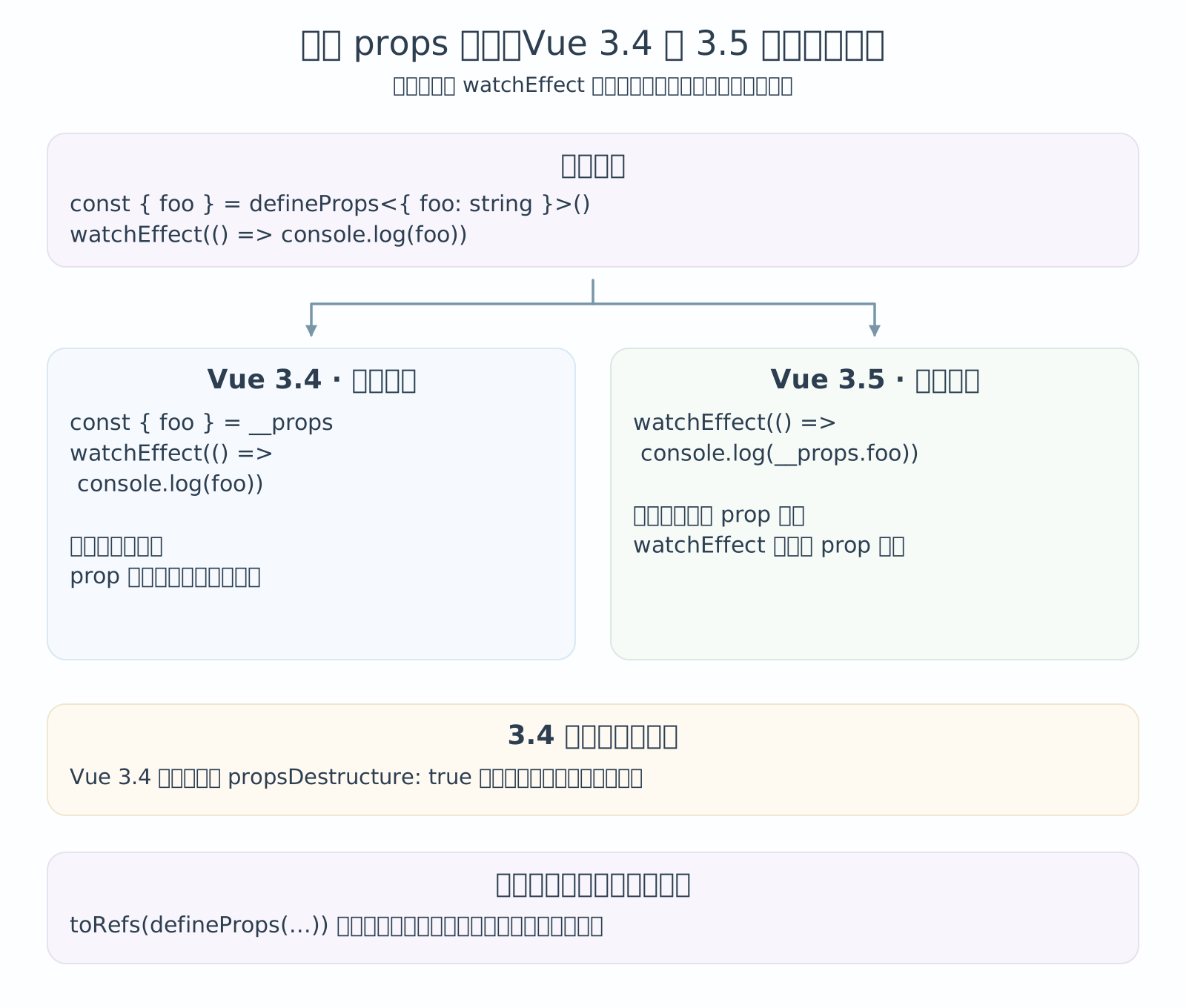
当时项目安装的是 @vue/compiler-sfc@3.4.24,这里的 props destructure 还是实验能力;Vue 3.5 把它稳定并默认启用。看 vuejs/core@v3.4.24 的上游源码会更直观:先由 processPropsDestructure 记录「公开 prop 名」和「本地变量名」的关系。
// packages/compiler-sfc/src/script/definePropsDestructure.ts:27-54
export function processPropsDestructure(
  ctx: ScriptCompileContext,
  declId: ObjectPattern,
) {
  if (!ctx.options.propsDestructure) {
    return
  }
  warnOnce(
    `This project is using reactive props destructure, which is an experimental ` +
      `feature. It may receive breaking changes or be removed in the future, so ` +
      `use at your own risk.\n` +
      `To stay updated, follow the RFC at https://github.com/vuejs/rfcs/discussions/502.`,
  )
  ctx.propsDestructureDecl = declId
  const registerBinding = (
    key: string,
    local: string,
    defaultValue?: Expression,
  ) => {
    ctx.propsDestructuredBindings[key] = { local, default: defaultValue }
    if (local !== key) {
      ctx.bindingMetadata[local] = BindingTypes.PROPS_ALIASED
      ;(ctx.bindingMetadata.__propsAliases ||
        (ctx.bindingMetadata.__propsAliases = {}))[local] = key
    }
  }

  // ...
后面如果确实记录到了 propsDestructureDecl,才会进入 transformDestructuredProps。这一步会把本地变量名反查回真实 prop 名,再把源码里访问本地变量的位置改写成访问 __props.xxx。
对应源码分别在 compileScript.ts、transformDestructuredProps 和 rewriteId。
// packages/compiler-sfc/src/compileScript.ts:663-666
if (ctx.propsDestructureDecl) {
  transformDestructuredProps(ctx, vueImportAliases)
}
// packages/compiler-sfc/src/script/definePropsDestructure.ts:103-122
export function transformDestructuredProps(
ctx: ScriptCompileContext,
vueImportAliases: Record<string, string>,
) {
if (!ctx.options.propsDestructure) {
return
}
const rootScope: Scope = {}
const scopeStack: Scope[] = [rootScope]
let currentScope: Scope = rootScope
const excludedIds = new WeakSet<Identifier>()
const parentStack: Node[] = []
const propsLocalToPublicMap: Record<string, string> = Object.create(null)
for (const key in ctx.propsDestructuredBindings) {
const { local } = ctx.propsDestructuredBindings[key]
rootScope[local] = true
propsLocalToPublicMap[local] = key
}// packages/compiler-sfc/src/script/definePropsDestructure.ts:194-223
function rewriteId(id: Identifier, parent: Node, parentStack: Node[]) {
if (
(parent.type === 'AssignmentExpression' && id === parent.left) ||
parent.type === 'UpdateExpression'
) {
ctx.error(`Cannot assign to destructured props as they are readonly.`, id)
}
if (isStaticProperty(parent) && parent.shorthand) {
// let binding used in a property shorthand
// skip for destructure patterns
if (
!(parent as any).inPattern ||
isInDestructureAssignment(parent, parentStack)
) {
// { prop } -> { prop: __props.prop }
ctx.s.appendLeft(
id.end! + ctx.startOffset!,
`: ${genPropsAccessExp(propsLocalToPublicMap[id.name])}`,
)
}
} else {
// x --> __props.x
ctx.s.overwrite(
id.start! + ctx.startOffset!,
id.end! + ctx.startOffset!,
genPropsAccessExp(propsLocalToPublicMap[id.name]),
)
}
}把同一个样例打开 props destructure 后编译,结果也能对上这个流程。
源码:
import { watchEffect } from 'vue';

const { foo } = defineProps<{ foo: string }>();

watchEffect(() => {
  console.log(foo);
});
编译后关键部分:
import { defineComponent as _defineComponent } from 'vue'
import { watchEffect } from 'vue';

export default /*#__PURE__*/_defineComponent({
  __name: 'Demo',
  props: {
    foo: { type: String, required: true }
  },
  setup(__props: any, { expose: __expose }) {
    __expose();

    watchEffect(() => {
      console.log(__props.foo);
    });

    return { watchEffect };
  }
});
编译结果生成了组件 props 选项,去掉解构声明,并把 watchEffect 中的 foo 改为 __props.foo;响应性由这次改写保留。
它不等于下面这种写法也成立:
const { foo } = toRefs(defineProps<Props>());编译器需要直接看到 defineProps 和左侧解构,例如:
const { foo = 'hello' } = defineProps<Props>();需要 foo.value 或向 composable 传入 Ref<T> 时,即使在 Vue 3.5,也可以把宏声明与 toRefs 转换分成两步:
const props = defineProps<Props>();
const { foo } = toRefs(props);
- Vue 官方文档:
<script setup>的 Reactive Props Destructure 说明,Vue 3.5+ 访问解构 prop 时,会在同一个<script setup>内生成props.xxx读取。