Vue script setup 中组件静默消失的原因:一次命名冲突排查(1):从静默消失定位到命名冲突
Vue script setup 中组件静默消失的原因:一次命名冲突排查 · 第 1 篇(当前) · 2 · 3
页面底部的反馈组件消失了,其他部分正常,控制台也没有明显 error。最后查到,<script setup> 里的状态名 popupStatus 和组件名 PopupStatus 只差大小写,模板中的 <popup-status> 被编译成了状态对象的引用。
改名能恢复显示,编译产物则解释了为什么会选错。这个问题涉及 Vue 的绑定分类、候选名顺序和运行时 warning;不同版本和组件写法的风险也有差异。
现象
有一个 Popup 页面,底部应该渲染一个反馈组件:
<popup-status :message="popupStatus.message" :type="popupStatus.type" />组件从 barrel 里导入,关键绑定如下:
import { PopupStatus } from './components';同一个 <script setup> 里又从页面流程 composable 解构出一个状态对象:
const { popupStatus } = usePopupFlow();完整现场片段与最小复现见命名冲突复现弹窗。
页面运行后,底部反馈文案没有了。奇怪的是控制台没有明显 error,页面其他部分也能正常工作。
组件消失、其他部分正常,很容易让人先怀疑样式遮挡、v-if 条件、组件导出或构建缓存。这次线索在 <popup-status> 这个 tag 的解析结果里。
修复方式
修复时,把状态对象从 popupStatus 改成不会和组件名冲突的 popupFeedback。
<popup-status :message="popupFeedback.message" :type="popupFeedback.type" />对应脚本也改成:
const { popupFeedback } = usePopupFlow();改完之后,底部提示恢复显示;前后编译产物的绑定变化也与命名冲突一致。
改名恢复了显示,但还有两个问题需要解释:为什么 Vue 会把一个普通对象当成组件,而且为什么没有直接报错?
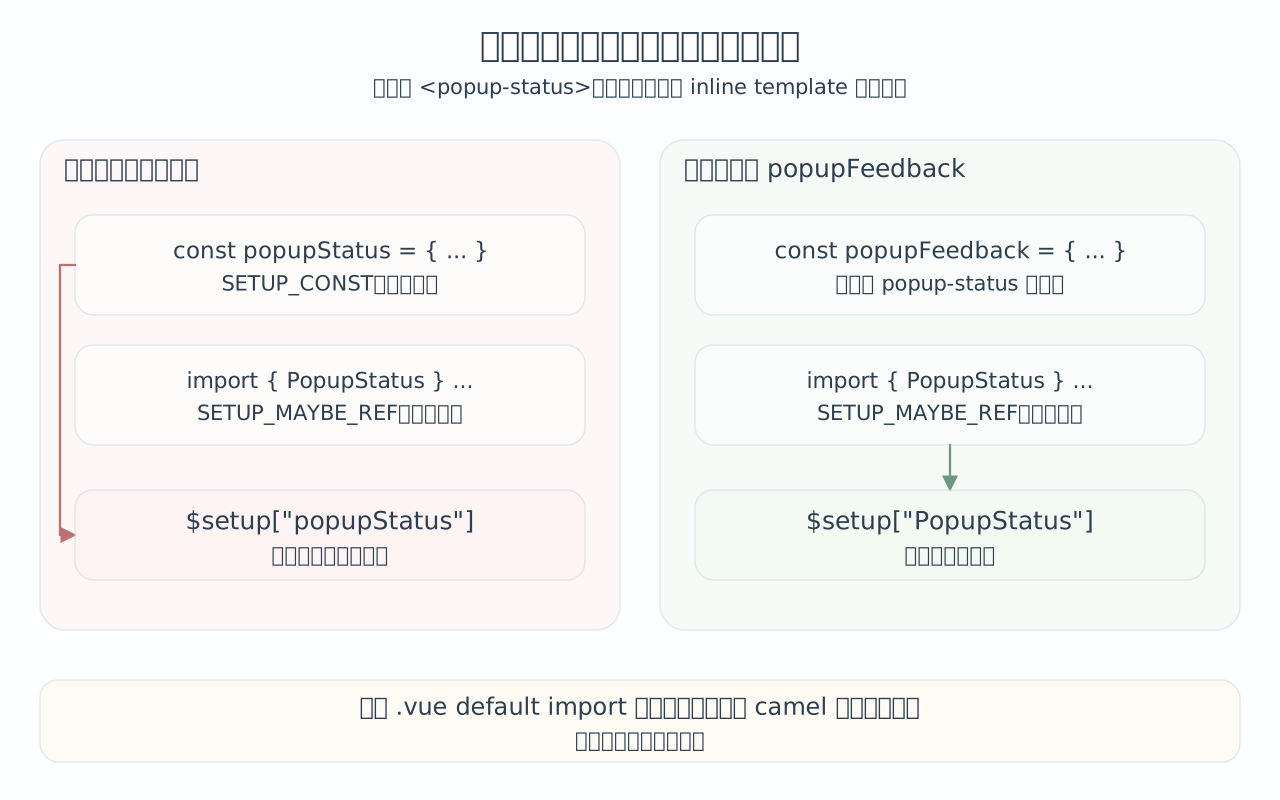
这里只展示正文的命名修复。改为直接 .vue 导入,不会自动消除同类型内部的候选名冲突。
文档里写了什么
Vue 官方文档说明了顶层绑定和组件 tag 的关系,但没有完整展开这次命名冲突的边界。
Vue
<script setup>文档 说明,<script setup>里的顶层绑定会暴露给 template。这里的顶层绑定包括变量、函数和 import。
所以下面这个变量可以直接在模板里用:
<script setup>
const msg = 'Hello';
</script>

<template>
  <div>{{ msg }}</div>
</template>
import 进来的函数也可以直接用:
<script setup>
import { capitalize } from './helpers';
</script>

<template>
  <div>{{ capitalize('hello') }}</div>
</template>
导入的组件同样属于模板可访问的顶层绑定。
Vue
<script setup>的 Using Components 说明,<script setup>里的组件可以直接作为自定义组件 tag 使用。文档里还特别提醒:可以把MyComponent理解成一个变量引用;<my-component>这种 kebab-case 等价写法也可以工作,但更推荐使用 PascalCase。
例如:
<script setup>
import MyComponent from './MyComponent.vue';
</script>

<template>
  <MyComponent />
</template>
或者:
<template>
  <my-component />
</template>
Vue 组件注册文档里的 Component Name Casing 也说明,Vue 支持把 kebab-case tag 解析到 PascalCase 注册名或组件名上。
这些文档足够说明两件事:
<script setup>的模板能看到顶层变量和 import。<popup-status>有机会解析到PopupStatus。
但文档没有明确说清楚一个细节:如果同一个 SFC 里同时存在 PopupStatus 和 popupStatus,<popup-status> 会先命中谁。
这个优先级,就需要看编译产物和源码。
最小编译实验中,模板生成了 $setup["popupStatus"],命中了同名普通对象,而非导入组件 PopupStatus。完整 SFC、编译脚本和产物见命名冲突的完整复现弹窗。
把状态对象改为 popupFeedback 后,候选不再命中 popupStatus,render 函数改为引用真正的 PopupStatus 组件。完整内容见改名后的编译产物弹窗。
版本边界
这套顺序要按版本说清楚。当前文章主要按 Vue 3.5 的源码解释,它能覆盖现在项目里遇到的问题,但不能直接说「Vue 3 所有版本完全一样」。
| 版本范围 | 静态组件 tag 的关键解析机制 |
|---|---|
| Vue 3.4+ / 3.5 | const-like -> maybe-ref-like -> props,然后才是自引用组件和运行时注册组件 |
| Vue 3.3 | const-like -> maybe-ref-like;没有 props 这一支 |
| Vue 3.1 / 3.2 | SETUP_CONST -> maybe-ref-like;这里只有单个 SETUP_CONST,还不是后来的完整 const-like 组,也没有 props 这一支 |
| Vue 3.0 | 只做 bindingMetadata[tag] === 'setup' 的原名精确匹配,没有后续版本的 kebab-case -> camelCase -> PascalCase |
Vue 2.7 官方 <script setup> |
类似地按名字格式匹配,并且 const-like 早于 maybe-ref-like,但没有 props 这一支;它属于 Vue 2 编译器的另一套实现 |
| Vue 2.6 或更早 + antfu 插件 | 第三方插件先转成普通 <script>,并把模板组件 tag 注入 components;当前案例不走 $setup["popupStatus"] 路径 |
表格里的 const-like 是本文为了方便阅读起的分组名,不是 Vue 源码里的单个枚举。Vue 3.3+ 的 const-like 包括
SETUP_CONST、SETUP_REACTIVE_CONST和LITERAL_CONST;Vue 3.1 / 3.2 的resolveSetupReference()只检查单个SETUP_CONST,所以表格里单独写SETUP_CONST。对当前案例来说,最重要的是 import 和 const 的相对顺序。从 Vue 3.1 开始,
resolveSetupReference()已经按「先 const / 后 maybe-ref」处理,因此const popupStatus比import { PopupStatus } ...更早命中的风险已经存在。props 参与组件 tag 解析,则是 Vue 3.4+ 才需要放进同一张优先级图里的边界。Vue 3.0 不能归到同一结论里。它的组件 tag 解析只检查原始 tag 是否正好等于某个 setup 绑定名,所以
<popup-status>不会继续尝试popupStatus/PopupStatus。由于popup-status不是合法的 JS 变量名,kebab-case 静态 tag 在 Vue 3.0 里几乎不可能命中<script setup>顶层导入;如果它还能工作,通常是因为后续掉到了resolveComponent("popup-status"),再由局部components或全局组件注册命中。所以当前文章里的典型冲突机制不能概括成「Vue 3 所有版本都一样」。重点要防的是 Vue 3.1+ 之后形成的候选名和分组顺序。这也是 Vue 3.0 和 antfu 插件最关键的差异:antfu 插件会先把模板组件 tag 统一转成 PascalCase 再找声明,Vue 3.0 的 setup 绑定解析没有这一步。Vue 3.0 的 PascalCase / camelCase 兼容只会在后续
resolveComponent()运行时解析局部或全局注册组件时出现,不会用于<script setup>顶层导入匹配。上面这些判断分别来自 Vue 3.0 的早期 setup 绑定判断、Vue 3.1、Vue 3.3、Vue 3.5 的
resolveSetupReference(),Vue 2.7 的checkBindingType(),以及unplugin-vue2-script-setup@0.11.4的transformScriptSetup()。
Vue 2.7 之前的第三方 <script setup> 方言采用不同处理路径,不能将本例的 $setup["popupStatus"] 结论直接套过去。完整内容见Vue 2 的历史方言弹窗。
为什么控制台没有明显报错
运行时发生的是:Vue 尝试把这个对象当成组件 options。
{ message: 'hello', type: 'success' }这个对象没有 setup、没有 render、没有 template。在开发环境里,Vue 会给出 warning:
Component is missing template or render function但它不是 error。生产构建里,warning 通常会被移除或不再输出。于是页面最终只会渲染出一个空注释节点:
<!---->因此页面没有红色 error,没有白屏,其他组件还在正常工作,只是某一块 UI 消失了。
可以用一个运行时最小例子模拟:
import { createApp, h } from 'vue';

const realPopupStatusComponent = {
  props: ['message', 'type'],
  render() {
    return h('p', { class: 'popup-status' }, this.message);
  }
};

const popupStatusStateObject = { message: '测试反馈文案', type: 'success' };

const conflictRoot = {
  render() {
    return h(popupStatusStateObject, {
      message: popupStatusStateObject.message,
      type: popupStatusStateObject.type
    });
  }
};

const fixedRoot = {
  render() {
    return h(realPopupStatusComponent, {
      message: popupStatusStateObject.message,
      type: popupStatusStateObject.type
    });
  }
};
冲突版渲染结果是:
<!---->正确版渲染结果是:
<p class="popup-status">测试反馈文案</p>如果开发环境 warning 被大量日志淹没,或者项目加载的是生产构建,这个问题就很容易被误判成样式、条件渲染或数据问题。
这和显式组件注册有什么不同
非 <script setup> 的普通组件写法里,组件可以显式写在 components 选项里,状态从 setup() 返回:
export default {
  components: {
    PopupStatus
  },
  setup() {
    const popupStatus = { message: 'hello', type: 'success' };

    return {
      popupStatus
    };
  }
};
这种写法里,组件注册名和 setup() 返回对象虽然仍然可能引起阅读混乱,但开发者至少能清楚看到「组件注册表」和「模板状态」是两块东西。
对 <popup-status> 这种静态组件 tag 来说,components 里的 PopupStatus 会优先于 setup() 返回的 popupStatus。普通组件写法不会让组件 tag 走 <script setup> 的 resolveSetupReference():普通 <script> 的 bindingMetadata 会被标记成 __isScriptSetup: false,模板编译会生成 resolveComponent("popup-status"),运行时再去查当前组件的 components 和全局 app.component。
const _component_popup_status = _resolveComponent("popup-status")静态组件 tag 通过组件注册表解析,setup() 返回的 popupStatus 则用于 :message="popupStatus.message" 这类模板表达式,两者在这里走的是不同路径。
这个结论只针对静态组件 tag。若写成
<component :is="popupStatus">,或者在 render 函数里直接h(popupStatus),那就是表达式 / 运行时值路径,setup()返回值当然会参与。相关源码可以看两处:普通
<script>的绑定分析会标记__isScriptSetup: false,resolveSetupReference()遇到这个标记会直接跳过;运行时组件解析则在resolveAsset()里先查局部注册,再查全局注册。
<script setup> 的机制不同。它把顶层绑定整体暴露给模板,组件 import 也是绑定,普通变量也是绑定。模板里的组件 tag 也会走这套绑定解析逻辑。
这也是为什么这个问题不容易靠直觉排出来:在 <script setup> 里,组件名不是一个单独的注册表 key,同样会走变量引用解析。
怎么规避
第一,组件名和状态名不要只差大小写或 kebab/camel 形态。
// 容易冲突
import { PopupStatus } from './components';
const popupStatus = ref(...);
推荐改成更具体的业务名:
import { PopupStatus } from './components';
const popupFeedback = ref(...);
或者:
const operationFeedback = ref(...);
const writeResultFeedback = ref(...);
第二,业务状态名不要为了贴近组件名而重复组件名。组件叫 PopupStatus,状态不一定也要叫 popupStatus。状态应该描述它在业务里的含义,例如反馈、写入结果、操作提示、错误消息。
第三,如果必须保留某个状态名,也可以给组件 import 起别名:
import { PopupStatus as PopupStatusView } from './components';模板里使用:
<popup-status-view :message="popupStatus.message" :type="popupStatus.type" />不过这通常不如改状态名自然。因为状态名 popupStatus 本身也偏宽,只说明它给 Popup 用,没有说明它承载的是反馈文案、写入结果还是页面状态。
第四,遇到组件无声消失时,不要只查样式和条件。可以直接看编译产物:
_createBlock($setup["popupStatus"], ...)如果这里不是预期组件名,就说明模板 tag 已经解析错了。
总结
状态名改为 popupFeedback 后,<popup-status> 恢复引用导入的 PopupStatus。组件名与状态名原本进入同一组模板候选,换成直接 .vue 导入仍可能发生同组冲突;语义不同的命名才消除了重叠。
运行时收到缺少 render 与 template 的对象,开发环境可能只有 warning,生产环境则可能只剩空注释。排查时同时看最小复现、编译产物引用的绑定和实际渲染结果,再按版本与组件写法判断;名字解析的详细过程见顶层绑定怎样参与模板名字解析。
下一篇:顶层绑定怎样参与模板名字解析。
命名冲突的完整复现
最小复现
先写一个最小化 SFC。
<template>
  <popup-status :message="popupStatus.message" :type="popupStatus.type" />
</template>

<script setup lang="ts">
import { PopupStatus } from './components';

const popupStatus = { message: 'hello', type: 'success' };
</script>直觉上,<popup-status> 应该对应导入的 PopupStatus 组件,:message 和 :type 读取本地状态对象 popupStatus。
编译结果却指向了状态对象。
可以用 vue/compiler-sfc 做一个最小编译实验:
import { parse, compileScript, compileTemplate } from 'vue/compiler-sfc';

const source = `
<template>
  <popup-status :message="popupStatus.message" :type="popupStatus.type" />
</template>

<script setup lang="ts">
import { PopupStatus } from './components';

const popupStatus = { message: 'hello', type: 'success' };
</script>
`;

// 1. parse 把 .vue 文件拆成 SFC descriptor,也就是 template、script、style 这些块。
const { descriptor } = parse(source, { filename: 'Conflict.vue' });

// 2. compileScript 处理 <script setup>,返回 script 编译结果。
const compiledScript = compileScript(descriptor, { id: 'demo' });

// 3. compileTemplate 处理 <template>,生成 render 函数。
//    这里把 compiledScript.bindings 传进去,是为了让模板编译器知道模板里每个名字来自哪里。
const template = compileTemplate({
  id: 'demo',
  filename: 'Conflict.vue',
  source: descriptor.template.content,
  compilerOptions: {
    bindingMetadata: compiledScript.bindings
  }
});

console.log(compiledScript.bindings);
console.log(compiledScript.content);
console.log(template.code);
先看 compiledScript。它是 compileScript() 返回的「script 编译结果」对象,已经不再是原来的 <script> 标签。这个对象包含 attrs、imports、map、scriptAst、scriptSetupAst、deps 等信息;这里只关注和当前问题直接相关的两个字段:
compiledScript.bindings是给编译器继续使用的元数据,描述每个顶层绑定是什么类型。compiledScript.content是一个「内容为代码的字符串」,也就是compileScript()生成出来、后续会交给打包器继续处理并输出到产物里的组件代码。
第一个 console.log(compiledScript.bindings) 的输出是:
// compiledScript.bindings
{
  "PopupStatus": "setup-maybe-ref",
  "popupStatus": "setup-const"
}
第二个 console.log(compiledScript.content) 的输出是一段代码字符串。为了阅读方便,这里直接按代码格式展示:
import { defineComponent as _defineComponent } from 'vue'
import { PopupStatus } from './components';

export default /*@__PURE__*/_defineComponent({
  __name: 'Conflict',
  setup(__props, { expose: __expose }) {
    __expose();

    const popupStatus = { message: 'hello', type: 'success' };

    const __returned__ = {
      popupStatus,
      get PopupStatus() { return PopupStatus }
    }
    Object.defineProperty(__returned__, '__isScriptSetup', {
      enumerable: false,
      value: true
    })
    return __returned__
  }
})从这段产物可以看到,<script setup> 会被 compileScript 改成一个标准 defineComponent 组件,浏览器执行的是编译后的代码。原来的顶层变量会放进 setup(),最后通过 __returned__ 暴露给模板。
所以 bindings 和 __returned__ 是对应的:
{
  "PopupStatus": "setup-maybe-ref", // import 进来的组件变量
  "popupStatus": "setup-const"      // 本地 const 状态
}
接着看 template。它是 compileTemplate() 返回的「template 编译结果」对象,也不只有 code,还包括 ast、tips、errors、map 等信息。当前只关注 template.code,因为它能直接看出 <popup-status> 最终被编译成了什么。
第三个 console.log(template.code) 的输出是:
import { openBlock as _openBlock, createBlock as _createBlock } from "vue";

export function render(_ctx, _cache, $props, $setup, $data, $options) {
  return (_openBlock(), _createBlock($setup["popupStatus"], {
    message: $setup.popupStatus.message,
    type: $setup.popupStatus.type
  }, null, 8 /* PROPS */, ["message", "type"]));
}
compiledScript.content 里有 import 和 export default,template.code 里也有 import 和 export function render。它们是两个模块形态的代码片段,还要由构建插件组装成最终组件。
compileScript() 和 compileTemplate() 是底层编译 API,分别处理 script 和 template;在 Vite 项目中,@vitejs/plugin-vue 负责衔接两份产物。
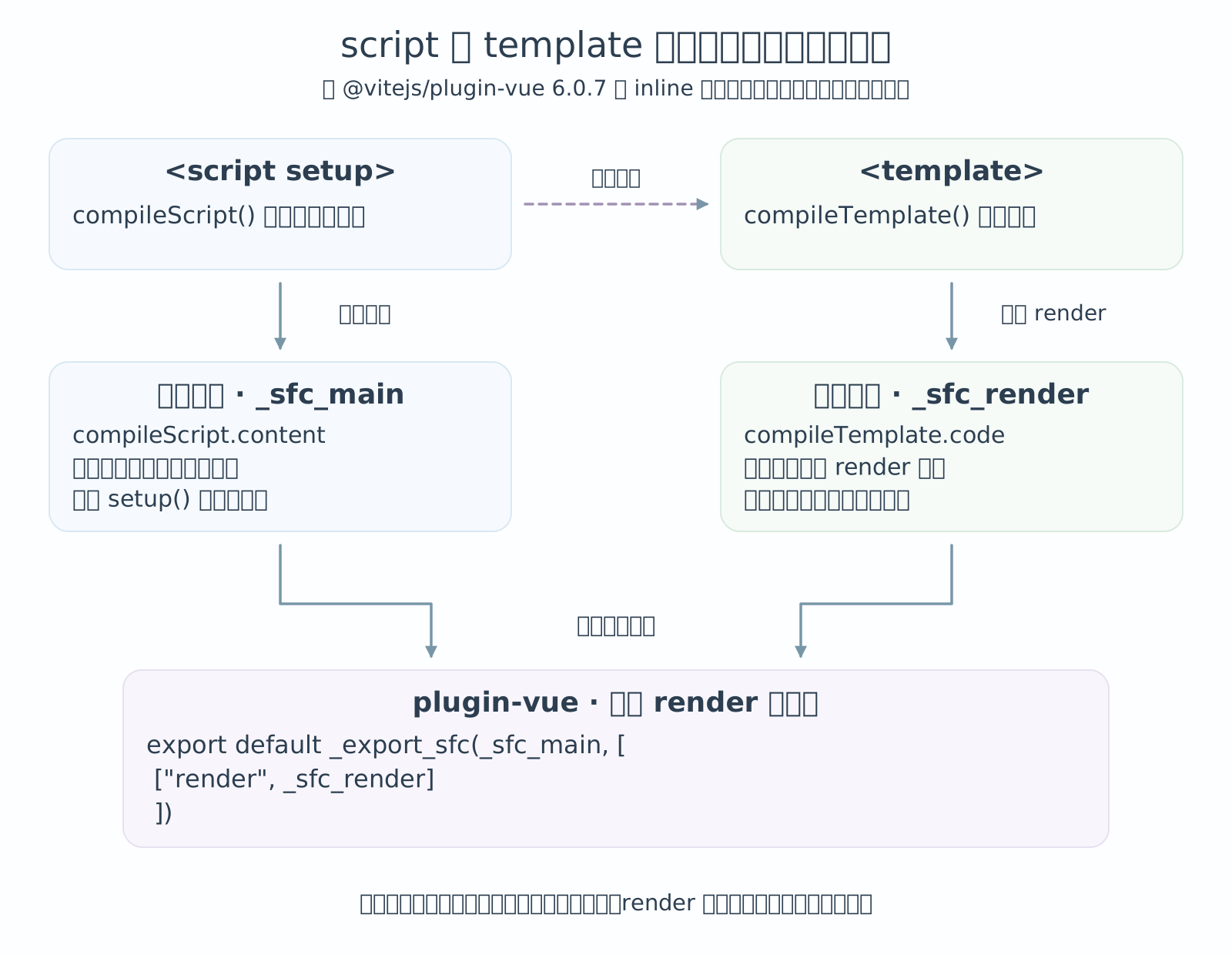
@vitejs/plugin-vue的transformMain会先生成 script 和 template 两段代码,并把 template 的 render 记录成要挂到组件上的属性。随后它把这些代码片段放进同一个output数组里,最后通过_export_sfc(_sfc_main, [['render', _sfc_render]])导出最终组件。
插件需要先拿到组件主体和 render 的内部绑定,把 render 挂到组件上,再导出组装后的组件,因此会做两类改写。
第一类是把 script 的默认导出改成内部变量。@vitejs/plugin-vue 里有一个固定的组件变量名 _sfc_main,compileScript() 在合适的时候会直接生成 const _sfc_main = ...;否则插件也会用 rewriteDefault() 把默认导出改写成这个变量。
scriptIdentifier就是_sfc_main。这一步的目的很直接:先拿到组件对象,但暂时不要export default。
第二类是把 template 的具名导出改成内部 render 函数。compileTemplate() 原本输出的是 export function render(...),而 Vite 插件在把 template 合进主模块时,会把它改成 function _sfc_render(...)。
transformTemplateInMain做的核心事情就是把export function render或export const render改成_sfc_render这种内部名字。
下面的伪代码展示 script、template 和最终默认导出的关系,是简化后的模块结构,不对应某一个源码文件:
import { defineComponent as _defineComponent } from 'vue';
import { openBlock as _openBlock, createBlock as _createBlock } from 'vue';
import { PopupStatus } from './components';
import _export_sfc from 'plugin-vue:export-helper';

const _sfc_main = /* @__PURE__ */ _defineComponent({
  __name: 'Conflict',
  setup(__props, { expose: __expose }) {
    __expose();

    const popupStatus = { message: 'hello', type: 'success' };

    const __returned__ = {
      popupStatus,
      get PopupStatus() { return PopupStatus }
    };

    Object.defineProperty(__returned__, '__isScriptSetup', {
      enumerable: false,
      value: true
    });

    return __returned__;
  }
});

function _sfc_render(_ctx, _cache, $props, $setup, $data, $options) {
  return (_openBlock(), _createBlock($setup["popupStatus"], {
    message: $setup.popupStatus.message,
    type: $setup.popupStatus.type
  }, null, 8 /* PROPS */, ["message", "type"]));
}

export default /*#__PURE__*/_export_sfc(_sfc_main, [
  ['render', _sfc_render]
]);最终模块只有一个默认导出;compiledScript.content 贡献的是组件主体 _sfc_main,template.code 贡献的是渲染函数 _sfc_render,构建插件把后者挂回前者,再导出完整组件。
openBlock 用于打开一个 block,createBlock 用于在里面创建一个有意义的渲染块。当前需要关注的是 createBlock 的第一个参数,它表示要渲染的组件类型或标签类型。
真正决定绑定的是这一句:
_createBlock($setup["popupStatus"], ...)$setup 是 render 函数运行时收到的参数,可以粗略理解成前面 setup() 返回给模板使用的对象。它的具体值要等组件运行起来以后才有。
但 ["popupStatus"] 不是运行时动态决定的。它已经在编译阶段被写死进 render 函数了。问题发生在编译阶段:模板编译器已经决定 <popup-status> 要读取 $setup["popupStatus"],运行时只是照着这段代码执行。
前面的 __returned__ 里同时有 popupStatus 和 PopupStatus。一旦编译产物固定成 $setup["popupStatus"],运行时即使 $setup 里也存在真正的组件 PopupStatus,这里也不会再去重新选择它。
Vue 编译器把这个普通对象当成了组件:
const popupStatus = { message: 'hello', type: 'success' };现场的完整组件导入
import { ActionFooter, EmptyState, KeySelectionTree, PopupStatus, SettingsForm } from './components';现场的完整状态解构
const {
  copyConsoleWriteScript,
  copyConsoleWriteScriptIsLoading,
  hasKeySelectionPreview,
  keySelectionOverrides,
  popupStatus,
  primaryActionIsLoading,
  readCurrentTable,
  selectedTagKeys,
  settings,
  targetTabsSnapshot,
  updateSettings,
  writeSelectedKeys
} = usePopupFlow();
改名后的完整状态解构
const {
  copyConsoleWriteScript,
  copyConsoleWriteScriptIsLoading,
  hasKeySelectionPreview,
  keySelectionOverrides,
  popupFeedback,
  primaryActionIsLoading,
  readCurrentTable,
  selectedTagKeys,
  settings,
  targetTabsSnapshot,
  updateSettings,
  writeSelectedKeys
} = usePopupFlow();
改名后的编译产物
改名后的产物
把状态对象改成 popupFeedback:
<template>
  <popup-status :message="popupFeedback.message" :type="popupFeedback.type" />
</template>

<script setup lang="ts">
import { PopupStatus } from './components';

const popupFeedback = { message: 'hello', type: 'success' };
</script>
再编译一次,结构会变成这样:
// compiledScript.bindings
{
  "PopupStatus": "setup-maybe-ref",
  "popupFeedback": "setup-const"
}

// compiledScript.content 里的返回对象
const __returned__ = {
  popupFeedback,
  get PopupStatus() { return PopupStatus }
}
return __returned__

// template.code 里的 render 函数
import { openBlock as _openBlock, createBlock as _createBlock } from "vue";

export function render(_ctx, _cache, $props, $setup, $data, $options) {
  return (_openBlock(), _createBlock($setup["PopupStatus"], {
    message: $setup.popupFeedback.message,
    type: $setup.popupFeedback.type
  }, null, 8 /* PROPS */, ["message", "type"]));
}
这次 __returned__ 里没有 popupStatus,<popup-status> 的候选名只会命中 PopupStatus。所以 render 函数里变成了正确结果:
_createBlock($setup["PopupStatus"], ...)Vue 2 的历史方言
Vue 2.7 之前的第三方方言
Vue 2.7 发布前,常见的 <script setup> 方言主要是 Anthony Fu 的 unplugin-vue2-script-setup。它的 README 说明,Vue 2.7 已经内置 Composition API 和 <script setup>,因此不再需要这个插件;插件进入维护模式,只支持 Vue 2.6 或更早版本。
unplugin-vue2-script-setup的说明见 README。这里讨论的是这个插件的最后版本v0.11.4,不是 Vue 2.7 官方编译器实现。
这个插件的核心方式是先改写源码。transformVue() 会解析 SFC,调用 transformScriptSetup() 生成普通 <script> 内容,然后用这个 <script> 替换原来的 <script setup> 块。
const sfc = await parseSFC(input, id);

const { code } = transformScriptSetup(sfc, options);

if (code) {
  const block = `<script ${attr}>\n${code}\n</script>`;

  s.remove(sfc.script.start, sfc.script.end);

  if (sfc.scriptSetup.start !== sfc.scriptSetup.end) {
    s.overwrite(sfc.scriptSetup.start, sfc.scriptSetup.end, block);
  }

  // ...
}
对应源码在
transform.ts。它的作用是在 Vue 2 编译器前面先做一次源码转译,而不是让 Vue 2 编译器原生理解<script setup>。
它还会先从模板里收集组件 tag。<popup-status> 会被转成 PopupStatus,放进 template.components。
const result = codeOfTemplate
  ? findReferencesForSFC(codeOfTemplate)
  : undefined;

return {
  // ...
  template: {
    components: new Set(result?.components.map(pascalize)),
    directives: new Set(/* ... */),
    identifiers: new Set(result?.identifiers)
  },
  scriptSetup,
  script
};
随后 transformScriptSetup() 会用这个组件名去顶层声明里找匹配项:
const components = Array.from(template.components)
  .map(
    component =>
      declarationArray.find(declare => declare === component)
      ?? declarationArray.find(declare => pascalize(declare) === component),
  )
  .filter(notNullish);
这段顺序很关键。假设代码里同时有:
import { PopupStatus } from './components';

const popupStatus = { message: 'hello', type: 'success' };
<popup-status> 对应的组件名是 PopupStatus。插件会先用 declare === component 精确命中导入的 PopupStatus,只有精确找不到时,才会尝试 pascalize(popupStatus)。因此在这个组合里,popupStatus 这个普通状态对象不会抢走组件 tag。
最后插件会把命中的组件注入普通组件选项,生成效果类似:
__sfc_main.components = Object.assign(
  { PopupStatus },
  __sfc_main.components,
);
对应源码在
parseSFC.ts和transformScriptSetup.ts。组件注入在transformScriptSetup.ts。
所以,Vue 2.6 或更早版本配这个插件时,当前文章里的典型问题不能直接照搬。它会先把导入组件挂到 components 上,静态组件 tag 后续走普通 Vue 2 组件解析;而 Vue 3.1+ / Vue 2.7 官方 <script setup> 的问题点,是编译器把静态组件 tag 解析成 setup 绑定。
这不表示 2.6 插件完全没有名字风险。如果模板里只有一个叫 popupStatus 的普通对象可以被 pascalize() 匹配到,它仍然可能被注入 components。只是对「导入组件 PopupStatus + 同名状态对象 popupStatus」这个真实案例来说,2.7 之前的 antfu 插件不会按本文这条 $setup["popupStatus"] 路径失败。